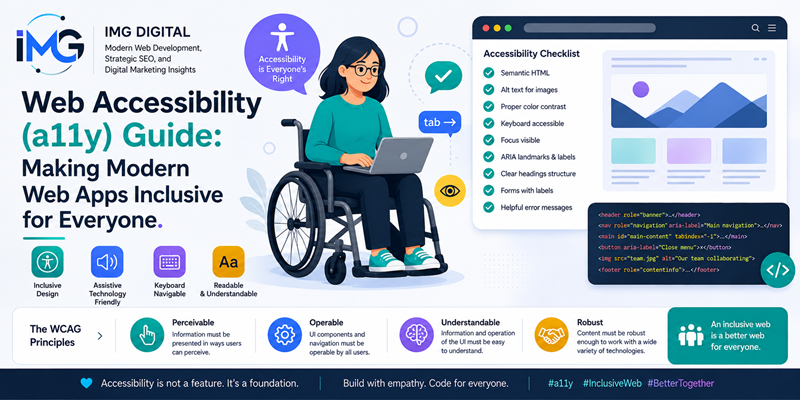
Web Accessibility (a11y) Guide: Making Modern Web Apps Inclusive for Everyone – The internet has become an essential infrastructure for global education, commerce, and communication. However, millions of individuals with visual, auditory, motor, or cognitive impairments encounter severe barriers when navigating digital platforms.
Web Accessibility (a11y) Guide: Making Modern Web Apps Inclusive for Everyone
As a result, web accessibility—commonly abbreviated as a11y—has evolved from an optional feature into a fundamental pillar of modern software engineering. Specifically, creating inclusive web applications ensures that every user can perceive, understand, and interact with digital content seamlessly. Therefore, this comprehensive guide explores essential strategies for engineering web applications that are accessible to everyone.
Understanding WCAG Guidelines and the Four Accessibility Pillars
To build accessible digital experiences, development teams must align their workflows with the Web Content Accessibility Guidelines (WCAG). Specifically, these international standards organize accessibility requirements around four core principles, known as the POUR framework.
1. Perceivable
Information and user interface components must be presented in ways that users can perceive easily. For example, providing text alternatives (alt text) for non-text media allows screen readers to read image descriptions aloud to visually impaired visitors.
2. Operable
User interface components and navigation controls must remain fully operable across diverse input devices. Specifically, every interactive feature on a website must be accessible using only a physical keyboard. Consequently, users who cannot operate a mouse can navigate forms, menus, and buttons effortlessly.
3. Understandable
Information and interface operations must remain clear and predictable. For instance, navigation structures must stay consistent across pages, and error messages must provide actionable correction instructions. As a result, users avoid confusion when completing complex digital tasks.
4. Robust
Content must remain robust enough to be interpreted reliably by a wide variety of user agents, including modern assistive technologies. Therefore, using standard HTML markup ensures that future browser updates will not break accessibility features.
Essential Technical Strategies for Inclusive Engineering
Implementing web accessibility requires deliberate structural choices throughout the front-end development cycle. Below, several foundational engineering techniques demonstrate how to enhance accessibility natively. Gamification in Modern Web Design: Boosting User Engagement with JavaScript
1. Prioritize Semantic HTML Over Generic Elements
While custom <div> and <span> tags offer visual flexibility, they lack built-in accessibility roles. Conversely, native semantic elements—such as <header>, <main>, <button>, and <nav>—automatically convey structural meaning to assistive tools. Therefore, developers should always choose native interactive elements before considering custom ARIA overrides.
2. Utilize ARIA Attributes Judiciously
Accessible Rich Internet Applications (ARIA) attributes bridge gaps when native HTML elements cannot satisfy complex interface demands. For example, aria-expanded signals whether an accordion drawer is open, while aria-live announces dynamic content updates to screen reader users. However, developers must remember the golden rule of ARIA: do not use ARIA if a native HTML element can perform the exact same function.
3. Ensure Clear Focus Indicators and Contrast Ratios
Visual design plays a crucial role in accessibility. Specifically, developers must maintain strong color contrast ratios between text and background elements. According to WCAG standards, normal text requires a minimum contrast ratio of 4.5:1. Furthermore, websites must never remove the default CSS outline property without replacing it with a custom visible focus indicator. Consequently, keyboard navigators can track their cursor focus clearly across the page layout.
Testing and Auditing Accessible Web Applications
Building an accessible web application is an ongoing process that demands continuous evaluation. Therefore, engineering teams should combine automated testing scripts with manual auditing procedures.
Automated Accessibility Scans
Automated testing tools—such as Google Lighthouse, axe-core, and WAVE—can detect common accessibility violations instantly. For instance, these tools highlight missing image attributes, low contrast text, and duplicate HTML element IDs. Consequently, developers can resolve basic structural flaws early in the build pipeline.
Manual Assistive Technology Testing
Although automated tools catch many technical errors, they cannot evaluate real-world user experience. Therefore, manual testing remains indispensable. Specifically, developers should test applications using screen readers like NVDA, JAWS, or Apple VoiceOver. In addition, navigating the entire web application using only the Tab and Enter keys reveals hidden keyboard navigation traps.
Summary
In conclusion, web accessibility is not merely a legal compliance requirement; it is a fundamental human obligation in modern software engineering. By adopting semantic HTML structures, implementing explicit ARIA attributes, and maintaining high visual contrast, development teams build truly inclusive web applications. Furthermore, accessible coding practices improve overall search engine optimization, accelerate page speed, and enhance usability for every visitor. Ultimately, prioritizing accessibility ensures that the digital world remains open, equal, and accessible to everyone.