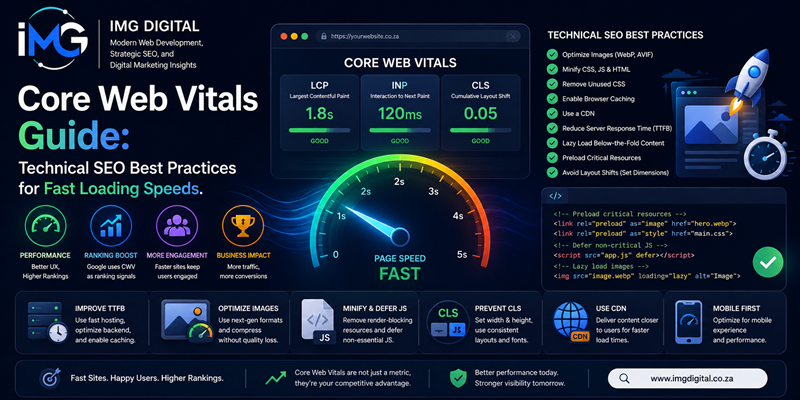
Core Web Vitals Guide: Technical SEO Best Practices for Fast Loading Speeds – User experience and site speed are fundamental drivers of modern search engine success. In the past, search algorithms prioritized keyword placement and backlinking metrics almost exclusively. However, modern search engines evaluate actual page experience directly.
Core Web Vitals Guide: Technical SEO Best Practices for Fast Loading Speeds
Specifically, Google incorporates Core Web Vitals into its ranking criteria to evaluate web loading speed, responsiveness, and visual stability. Consequently, technical SEO strategies must prioritize optimizing these performance benchmarks. Therefore, this comprehensive guide explores actionable best practices to improve Core Web Vitals and maximize search visibility.
Understanding the Three Core Web Vitals Metrics
Core Web Vitals represent standardized performance metrics measuring real-world user experience. Currently, these metrics evaluate three critical dimensions of webpage performance:
-
Largest Contentful Paint (LCP): LCP measures perceived loading speed. Specifically, it marks the exact time required to render the largest visible element—such as a hero image or primary heading—within the user viewport. An optimal LCP score remains under 2.5 seconds.
-
Interaction to Next Paint (INP): INP evaluates visual responsiveness. Unlike legacy responsiveness metrics, INP assesses the execution delay of all user interactions—such as button clicks or menu taps—throughout a session. An optimal INP score stays below 200 milliseconds.
-
Cumulative Layout Shift (CLS): CLS measures visual stability. Specifically, it quantifies unexpected layout shifts occurring while page assets load. An optimal CLS score stays below 0.1.
Technical Strategies to Optimize Largest Contentful Paint (LCP)
Improving LCP requires streamlining the critical rendering path so primary content displays instantly. To achieve this, development teams should apply these technical optimizations:
-
Optimize Server Response Time (TTFB): Slow server responses delay asset delivery. Therefore, implementing edge caching and Content Delivery Networks (CDNs) reduces Time to First Byte significantly.
-
Preload Critical Hero Assets: By utilizing
<link rel="preload">tags within the HTML<head>, browsers prioritize fetching primary LCP images before downloading secondary scripts. -
Compress and Convert Images: In addition, serving modern image formats like WebP or AVIF reduces payload sizes. As a result, visual rendering speeds improve dramatically across mobile networks. Semantic SEO Unlocked: How to Optimize Content for Entities, Not Just Keywords
Optimizing Interaction to Next Paint (INP) for Better Responsiveness
Heavy JavaScript execution frequently stalls the browser main thread, causing severe interaction delays. To minimize INP latency, front-end engineers should deploy these technical practices:
-
Break Up Long Tasks: Tasks taking longer than 50 milliseconds block the main thread. Consequently, breaking complex scripts into smaller asynchronous functions allows the browser to respond to user input promptly.
-
Defer Non-Essential JavaScript: Furthermore, adding
deferorasyncattributes to non-critical third-party scripts prevents them from blocking core UI interactions. -
Offload Computations to Web Workers: For heavy data processing, developers should utilize Web Workers. As a result, script execution moves off the main thread completely, keeping the interface responsive.
Eliminating Visual Instability for Cumulative Layout Shift (CLS)
Unexpected layout shifts frustrate users when page elements jump during reading or scrolling. To ensure visual stability, technical teams should enforce these guidelines:
-
Set Explicit Dimensions on Media Elements: Always include explicit
widthandheightattributes on<img>and<video>tags. Consequently, browsers reserve layout space before images finish downloading. -
Reserve Space for Dynamic Elements: In addition, allocate fixed container dimensions for dynamic ads or embeds to prevent content jumps.
-
Utilize Web Fonts Efficiently: Use
font-display: swapalongside preloaded web fonts to prevent invisible text during font rendering cycles.
Testing and Monitoring Core Web Vitals
Continuous performance monitoring is essential for maintaining high search rankings. Therefore, technical teams should combine field data with lab data tools. Specifically, Google PageSpeed Insights and Chrome User Experience Report (CrUX) provide real-user monitoring data. In addition, Google Search Console highlights URL performance issues across your entire domain. Consequently, developers can identify and resolve performance regressions early.
Summary
In conclusion, optimizing Core Web Vitals represents an essential requirement for modern technical SEO. By enhancing LCP loading speeds, reducing INP interaction delays, and eliminating CLS visual shifts, web applications deliver exceptional user experiences. Furthermore, meeting Google performance benchmarks improves organic search visibility and conversion rates. Ultimately, prioritizing web performance ensures long-term digital growth and competitive advantage across search results.