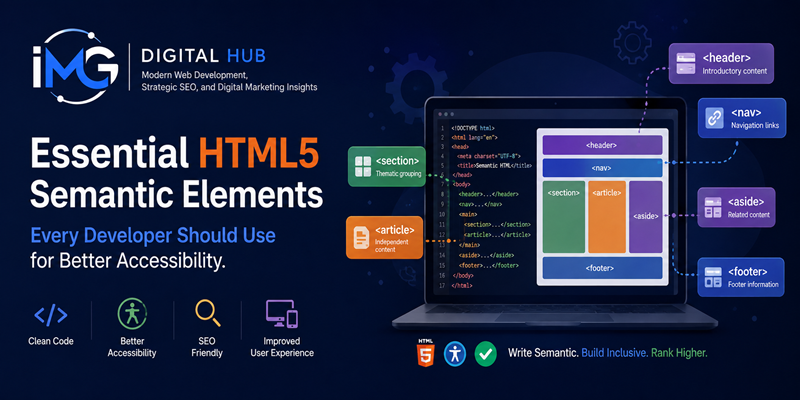
Essential HTML5 Semantic Elements Every Developer Should Use for Better Accessibility – Web development has evolved beyond merely displaying content on a screen. Modern web engineering requires building accessible, structured, and inclusive digital experiences for every user. HTML5 introduced semantic elements that fundamentally transformed how front-end developers organize document structures. Despite these standards, generic container elements like <div> and <span> remain heavily overused across the modern web.
Essential HTML5 Semantic Elements Every Developer Should Use for Better Accessibility
Understanding and implementing HTML5 semantic elements is far more than a clean code exercise. It directly impacts how screen readers, assistive technologies, and search engine crawlers interpret your web pages. This comprehensive guide explores the essential semantic HTML5 tags that every developer should implement to dramatically improve web accessibility.
Understanding the Role of Semantic HTML in Accessibility
Semantic HTML refers to markup tags that convey explicit meaning about the content contained within them. Unlike unsemantic tags that offer no structural context, semantic elements clearly describe their purpose to browser rendering engines, screen readers, and web crawlers alike.
When an individual accesses a website using assistive tools such as NVDA, JAWS, or Apple VoiceOver, the browser constructs an internal Accessibility Tree alongside the standard DOM. Unsemantic markup forces assistive technology to treat complex layouts as plain, unstructured text blocks. Consequently, users with visual or cognitive impairments face immense difficulty navigating the platform. Conversely, semantic markup automatically assigns landmark roles to page regions, enabling screen reader users to skip directly to desired sections.
Primary Structural Landmarks for Accessible Navigation
To construct an accessible webpage layout, developers must utilize landmark elements correctly. These fundamental tags outline the high-level architecture of your document.
1. The <header> and <footer> Elements
The <header> tag contains introductory content, such as branding logos, main titles, and primary navigation bars. Conversely, the <footer> element houses copyright notices, privacy policy links, and contact information. Utilizing these explicit tags allows screen readers to quickly identify structural boundaries without requiring custom ARIA landmark roles.
2. The <nav> Element
The <nav> element explicitly defines major navigation blocks across a website. Browsers treat content inside this tag as primary site navigation. As a result, screen reader users can choose to bypass repetitive navigation links when they prefer to read the main article immediately.
3. The <main> Element
The <main> tag represents the central, unique content of a given webpage. Developers must only include one <main> element per document. It isolates primary page content from repeated structural elements like sidebars and headers, serving as the default target for accessibility skip-links.
Content Grouping and Sectioning Elements
Establishing a clear content hierarchy helps users process information logically. HTML5 provides distinct tags for grouping related textual content appropriately.
<article> versus <section>
Distinguishing between <article> and <section> often challenges front-end developers. An <article> represents a self-contained composition that makes complete sense independently, such as a blog post, news report, or product review. Conversely, a <section> represents a thematic grouping of content, usually accompanied by an explicit heading. Furthermore, if the content block could be syndicated independently across third-party platforms, wrap it inside an <article>.
The <aside> Element
The <aside> element marks content that is indirectly related to the primary text surrounding it. Common examples include related article links, callout boxes, glossaries, and author profiles. Assistive technologies recognize <aside> as secondary information, allowing users to consume or skip it effortlessly.
Logical Heading Structure (<h1> to <h6>)
Maintaining a strict heading hierarchy within your semantic sections ensures a logical reading flow. Skipping heading levels, such as jumping directly from an <h1> to an <h3>, creates unnecessary confusion for screen reader users who rely on heading shortcuts to scan pages quickly.
Interactive and Media-Specific Semantic Tags
Accessibility extends far beyond page-level layout containers. Utilizing native interactive tags guarantees that keyboard and voice control systems function smoothly.
Native <button> versus Clickable <div>
A frequent front-end implementation error involves attaching click event handlers to generic <div> tags. Generic divs lack native keyboard focus states and screen reader activation triggers. Developers should always utilize the native <button> element for custom interactive triggers, as native buttons support automatic keyboard navigation via the Enter and Space keys.
<figure> and <figcaption>
When inserting diagrams, charts, code examples, or illustrative photos, enclose them within a <figure> tag accompanied by a <figcaption>. This structural pairing programmatically binds the descriptive caption to the media element, ensuring assistive tools present the context correctly.
The Dual Benefit: Accessibility Meets Search Engine Optimization
Beyond empowering users with disabilities, semantic HTML5 tags significantly enhance technical Search Engine Optimization (SEO). Search engine indexing bots parse web documents in a manner almost identical to screen readers. By establishing clear semantic boundaries, search engines can easily parse your content hierarchy, index key entities, and award rich snippet placements in search results.
Summary
Building an accessible web ecosystem begins with clean, meaningful HTML markup. By replacing arbitrary container elements with dedicated HTML5 semantic tags, developers instantly improve site accessibility, usability, and technical performance. Adopting these semantic standards represents a crucial step toward building a truly inclusive digital web for every user.